To create an html file to implement the styles related to table,text, fonts, links, lists using cascading style sheets.
HTML Source:
- HTML FILE 1 (Main Page) Source Code:
<html>
<head>
<title>HTML 3</title>
<link rel="stylesheet" type="text/css" href="E:\documents\IM LAB\html\css3\external.css">
</head>
<body>
<h1 style="text-align:center;">Department of Information Technology</h1>
<span style="text-align:center;">
<h2 style="text-decoration:underline;">
<a href="E:\documents\IM LAB\html\css3\css3- peo.html">
<abbr title="Program Educational Object">PEO</abbr>
</a>
</h2>
<table style="margin: 0px auto;width:300; height:400;" border="15" >
<caption style="font-weight:bold;font-size:30px;">
<abbr title="Guru Nanak Dev Engg. College">GNDEC</abbr>
</caption>
<tr>
<th style="text-decoration:none;">Department</th>
<th rowspan="3">
<a href="http://cc.gndec.ac.in/">Computer Center</a>
</th>
</tr>
<tr>
<th>
<a href="http://it.gndec.ac.in/">IT</a>
</th>
</tr>
<tr>
<th>
<a href="http://cse.gndec.ac.in/">CSE</a>
</th>
</tr>
</table>
</span>
<button type="button">
<a href="E:\documents\IM LAB\html\css3\css 3-form.html" style="font-weight:bolder;text-decoration:underline;">Registered?</a>
</button>
<hr><hr>
<span>
<a href="E:\documents\IM LAB\html\html3-mail link.html">Sanjampreet Singh</a>
<br>
<a href="http://sanjamhelping.blogspot.in/p/it-14304-it-methodologies-lab.html">Department Of Information Technology</a>
<br>
<a href="E:\documents\IM LAB\html\CSS 2\css 2.html"><-Last Practical</a>
<span class="indent"></span>
<a href="">Next Practical-></a>
<br>
</span>
</body>
</html>
- Output:

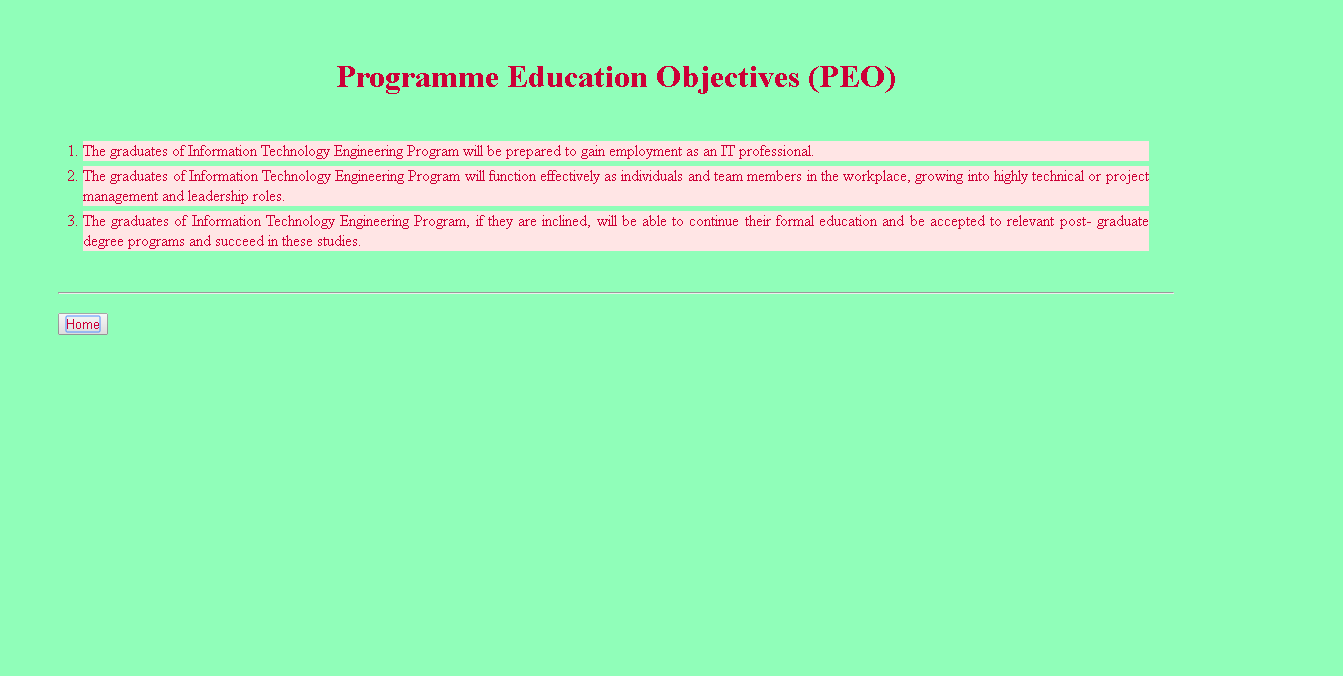
- HTML FILE 2 (PEO Page) Source Code:

<html>
<head>
<title>PEO</title>
<link rel="stylesheet" type="text/css" href="E:\documents\IM LAB\html\css3\external.css">
<style>
body
{
text-align:justify;
margin-right:10%;
padding:50px;
}
</style>
</head>
<body>
<center>
<h1>Programme Education Objectives (PEO)</h1>
</center>
<ol>
<li>The graduates of Information Technology Engineering Program will be prepared to gain employment as an IT professional.</li>
<li>The graduates of Information Technology Engineering Program will function effectively as individuals and team members in the workplace, growing into highly technical or project management and leadership roles.</li>
<li>The graduates of Information Technology Engineering Program, if they are inclined, will be able to continue their formal education and be accepted to relevant post- graduate degree programs and succeed in these studies.</li>
</ol>
<hr>
<h3>
<button type="button">
<a href="E:\documents\IM LAB\html\css3\css3.html">Home</a>
</button>
</h3>
</body>
</html>
- Output:

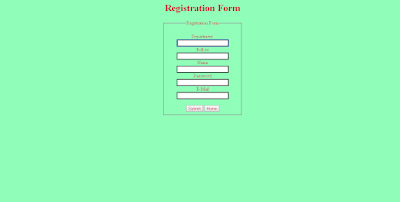
- HTML FILE 3 (Form Page) Source Code:
<html>
<head>
<title>Registration Form</title>
<link rel="stylesheet" type="text/css" href="E:\documents\IM LAB\html\css3\external.css">
</head>
<body>
<center>
<h1>Registration Form</h1>
<form method="get" action="123.html" style="padding:0.01% 40%;">
<fieldset>
<legend>Registration Form</legend>
<br>
Department <br>
<input type="text" name="dept"><br>
Roll no<br>
<input type="text" name="roll"><br>
Name<br>
<input type="text" name="fname"><br>
Password<br>
<input type="password" name="pass"><br>
E-Mail<br>
<input type="text" name="mail"><br><br>
<button type="submit"><a href="E:\documents\IM LAB\html\css3\css3-mail link.html">Submit</a></button>
<button><a href="E:\documents\IM LAB\html\css3\css3.html">Home</a></button>
</form>
</fieldset>
</center>
</body>
</html>
- Output:
- HTML FILE 4 (Mail Page) Source Code:

<html>
<head>
<title>Click To Mail</title>
<link rel="stylesheet" type="text/css" href="E:\documents\IM LAB\html\css3\external.css">
</head>
<body>
<center>
<div style="margin: 0px;padding: 22.5%;">
<button>
<a href ="mailto:sanjam531@gmail.com" style="font-size:50px;">Mail Here</a>
</button>
</div>
</center>
</body>
</html>
- Output:

- CSS Source Code:

body
{
background-color:#90FEB9;
color:#CC0037;
}
p
{
font-style:serif;
font-size:40px;
text-align: justify;
}
span
{
font-style:sans-serif;
text-decoration:underline;
font-size:20px;
text-align: center;
font-weight:bold;
}
a
{
color:#CC0037;
text-decoration:none;
}
ol
{
padding: 20px;
}
ol li
{
background: #ffe5e5;
margin: 5px;
}
span
{
font-style:sans-serif;
text-decoration:underline;
font-size:35px;
text-align: center;
}
span.indent
{
padding-left: 1em;
}
input[type=text],input[type=password]
{
border: 3px solid #555;
}
Include the following source Code in Document Environment in your LaTeX File
LaTeX Source:
\documentclass[12pt]{article}
\usepackage{graphicx}
\usepackage{wrapfig}
\usepackage{multicol}
\usepackage{caption}
\usepackage{subcaption}
\usepackage{transparent}
\usepackage{multirow}
\usepackage{eso-pic}
\usepackage[utf8]{inputenc}
\usepackage{color}
%%%%%%%%%%%%%%%%%%%%%%%%%%%%%%%%%%%%%%%%%%%%
\newcommand\BackgroundIm{
\put(0,0){
\parbox[b][\paperheight]{\paperwidth}{
\vfill
\centering
{\transparent{0.05} \includegraphics[height=\paperheight,width=\paperwidth,
keepaspectratio]{gne}
\vfill
}}}}
%%%%%%%%%%%%%%%%%%%%%%%%%%%%%%%%%%%%%%%%%%%%%%%%
\begin{document}
%%%%%%%%%%%%%%%%%%%%%%%%%%%%%%%%%%%%%%%%%%%%%%%%%%
\AddToShipoutPicture{\BackgroundIm}
%%%%%%%%%%%%%%%%%%%%%%%%%%%%%%%%%%%%%%%%%%%%%%%%%%%
\newpage
\pagenumbering{gobble}
\section{\emph{To create an html file to implement the styles related to table,text, fonts, links, lists using cascading style sheets.}}
\subsection{\emph{HTML FILE 1 (Main Page) Source Code:}}
\begin{verbatim}
<html>
<head>
<title>HTML 3</title>
<link rel="stylesheet" type="text/css" `
href="E:\documents\IM LAB\html\css3\external.css">
</head>
<body>
<h1 style="text-align:center;">Department of Information Technology</h1>
<span style="text-align:center;">
<h2 style="text-decoration:underline;">
<a href="E:\documents\IM LAB\html\css3\css3- peo.html">
<abbr title="Program Educational Object">PEO</abbr>
</a></h2>
<table style="margin: 0px auto;width:300; height:400;" border="15" >
<caption style="font-weight:bold;font-size:30px;">
<abbr title="Guru Nanak Dev Engg. College">GNDEC</abbr>
</caption><tr>
<th style="text-decoration:none;">Department</th>
<th rowspan="3">
<a href="http://cc.gndec.ac.in/">Computer Center</a></th>
</tr><tr><th>
<a href="http://it.gndec.ac.in/">IT</a></th>
</tr><tr><th>
<a href="http://cse.gndec.ac.in/">CSE</a>
</th></tr>
</table>
</span>
<button type="button">
<a href="E:\documents\IM LAB\html\css3\css 3-form.html"
style="font-weight:bolder;text-decoration:underline;">Registered?</a>
</button> <hr><hr>
<span>
<a href="E:\documents\IM LAB\html\html3-mail link.html">
Sanjampreet Singh</a><br>
<a href="http://sanjamhelping.blogspot.in/p/it-14304-it-
methodologies-lab.html">Department Of Information Technology</a>
<br><a href="E:\documents\IM LAB\html\CSS 2\css 2.html">
<-Last Practical</a><span class="indent"></span>
<a href="">Next Practical-></a><br>
</span>
</body>
</html>
\end{verbatim}
\subsubsection{\emph{Output:}}
\begin{figure}[h]
\centering
\includegraphics[scale=0.3]{p7}
\caption{Output Of Main Page}
\end{figure}
\newpage
\subsection{\emph{Code for PEO Page :}}
\begin{verbatim}
<html>
<head>
<title>PEO</title>
<link rel="stylesheet" type="text/css" href=
"E:\documents\IM LAB\html\css3\external.css">
<style>
body
{
text-align:justify;
margin-right:10%;
padding:50px;
}
</style>
</head>
<body>
<center>
<h1>Programme Education Objectives (PEO)</h1>
</center>
<ol>
<li>The graduates of Information Technology Engineering
Program will be prepared to gain employment as an IT professional.</li>
<li>The graduates of Information Technology Engineering
Program will function effectively as individuals and team
members in the workplace, growing into highly technical or
project management and leadership roles.</li>
<li>The graduates of Information Technology Engineering
Program, if they are inclined, will be able to continue their
formal education and be accepted to relevant post- graduate
degree programs and succeed in these studies.</li>
</ol>
<hr>
<h3>
<button type="button">
<a href="E:\documents\IM LAB\html\css3\css3.html">Home</a>
</button>
</h3>
</body>
</html>
\end{verbatim}
\subsubsection{\emph{Output:}}
\begin{figure}[h]
\centering
\includegraphics[scale=0.3]{p7peo}
\caption{Output PEO Page}
\end{figure}
\newpage
\subsubsection{\emph{Code for FORM Page:}}
\begin{verbatim}
<html>
<head>
<title>Registration Form</title>
<link rel="stylesheet" type="text/css"
href="E:\documents\IM LAB\html\css3\external.css">
</head>
<body>
<center>
<h1>Registration Form</h1>
<form method="get" action="123.html"
style="padding:0.01% 40%;">
<fieldset>
<legend>Registration Form</legend>
<br>
Department <br>
<input type="text" name="dept"><br>
Roll no<br>
<input type="text" name="roll"><br>
Name<br>
<input type="text" name="fname"><br>
Password<br>
<input type="password" name="pass"><br>
E-Mail<br>
<input type="text" name="mail"><br><br>
<button type="submit">
<a href="E:\documents\IM LAB\html\css3\css3-mail link.html">
Submit</a></button>
<button><a href="E:\documents\IM LAB\html\css3\css3.html">
Home</a></button>
</form>
</fieldset>
</center>
</body>
</html>
\end{verbatim}
\subsubsection{\emph{Output:}}
\begin{figure}[h]
\centering
\includegraphics[scale=0.3]{p7form}
\caption{Output FORM Page}
\end{figure}
\newpage
\subsubsection{\emph{Code for MAIL Page:}}
\begin{verbatim}
<html>
<head>
<title>Click To Mail</title>
<link rel="stylesheet" type="text/css"
href="E:\documents\IM LAB\html\css3\external.css">
</head>
<body>
<center>
<div style="margin: 0px;padding: 22.5%;">
<button>
<a href ="mailto:sanjam531@gmail.com"
style="font-size:50px;">Mail Here</a>
</button>
</div>
</center>
</body>
</html>
\end{verbatim}
\subsubsection{\emph{Output:}}
\begin{figure}[h]
\centering
\includegraphics[scale=0.3]{p7mail}
\caption{Output MAIL Page}
\end{figure}
\newpage
\subsubsection{\emph{Code for CSS:}}
\begin{verbatim}
body
{
background-color:#90FEB9;
color:#CC0037;
}
p
{
font-style:serif;
font-size:40px;
text-align: justify;
}
span
{
font-style:sans-serif;
text-decoration:underline;
font-size:20px;
text-align: center;
font-weight:bold;
}
a
{
color:#CC0037;
text-decoration:none;
}
ol
{
padding: 20px;
}
ol li
{
background: #ffe5e5;
margin: 5px;
}
span
{
font-style:sans-serif;
text-decoration:underline;
font-size:35px;
text-align: center;
}
span.indent
{
padding-left: 1em;
}
input[type=text],input[type=password]
{
border: 3px solid #555;
}
\end{verbatim}
\end{document}
\usepackage{graphicx}
\usepackage{wrapfig}
\usepackage{multicol}
\usepackage{caption}
\usepackage{subcaption}
\usepackage{transparent}
\usepackage{multirow}
\usepackage{eso-pic}
\usepackage[utf8]{inputenc}
\usepackage{color}
%%%%%%%%%%%%%%%%%%%%%%%%%%%%%%%%%%%%%%%%%%%%
\newcommand\BackgroundIm{
\put(0,0){
\parbox[b][\paperheight]{\paperwidth}{
\vfill
\centering
{\transparent{0.05} \includegraphics[height=\paperheight,width=\paperwidth,
keepaspectratio]{gne}
\vfill
}}}}
%%%%%%%%%%%%%%%%%%%%%%%%%%%%%%%%%%%%%%%%%%%%%%%%
\begin{document}
%%%%%%%%%%%%%%%%%%%%%%%%%%%%%%%%%%%%%%%%%%%%%%%%%%
\AddToShipoutPicture{\BackgroundIm}
%%%%%%%%%%%%%%%%%%%%%%%%%%%%%%%%%%%%%%%%%%%%%%%%%%%
\newpage
\pagenumbering{gobble}
\section{\emph{To create an html file to implement the styles related to table,text, fonts, links, lists using cascading style sheets.}}
\subsection{\emph{HTML FILE 1 (Main Page) Source Code:}}
\begin{verbatim}
<html>
<head>
<title>HTML 3</title>
<link rel="stylesheet" type="text/css" `
href="E:\documents\IM LAB\html\css3\external.css">
</head>
<body>
<h1 style="text-align:center;">Department of Information Technology</h1>
<span style="text-align:center;">
<h2 style="text-decoration:underline;">
<a href="E:\documents\IM LAB\html\css3\css3- peo.html">
<abbr title="Program Educational Object">PEO</abbr>
</a></h2>
<table style="margin: 0px auto;width:300; height:400;" border="15" >
<caption style="font-weight:bold;font-size:30px;">
<abbr title="Guru Nanak Dev Engg. College">GNDEC</abbr>
</caption><tr>
<th style="text-decoration:none;">Department</th>
<th rowspan="3">
<a href="http://cc.gndec.ac.in/">Computer Center</a></th>
</tr><tr><th>
<a href="http://it.gndec.ac.in/">IT</a></th>
</tr><tr><th>
<a href="http://cse.gndec.ac.in/">CSE</a>
</th></tr>
</table>
</span>
<button type="button">
<a href="E:\documents\IM LAB\html\css3\css 3-form.html"
style="font-weight:bolder;text-decoration:underline;">Registered?</a>
</button> <hr><hr>
<span>
<a href="E:\documents\IM LAB\html\html3-mail link.html">
Sanjampreet Singh</a><br>
<a href="http://sanjamhelping.blogspot.in/p/it-14304-it-
methodologies-lab.html">Department Of Information Technology</a>
<br><a href="E:\documents\IM LAB\html\CSS 2\css 2.html">
<-Last Practical</a><span class="indent"></span>
<a href="">Next Practical-></a><br>
</span>
</body>
</html>
\end{verbatim}
\subsubsection{\emph{Output:}}
\begin{figure}[h]
\centering
\includegraphics[scale=0.3]{p7}
\caption{Output Of Main Page}
\end{figure}
\newpage
\subsection{\emph{Code for PEO Page :}}
\begin{verbatim}
<html>
<head>
<title>PEO</title>
<link rel="stylesheet" type="text/css" href=
"E:\documents\IM LAB\html\css3\external.css">
<style>
body
{
text-align:justify;
margin-right:10%;
padding:50px;
}
</style>
</head>
<body>
<center>
<h1>Programme Education Objectives (PEO)</h1>
</center>
<ol>
<li>The graduates of Information Technology Engineering
Program will be prepared to gain employment as an IT professional.</li>
<li>The graduates of Information Technology Engineering
Program will function effectively as individuals and team
members in the workplace, growing into highly technical or
project management and leadership roles.</li>
<li>The graduates of Information Technology Engineering
Program, if they are inclined, will be able to continue their
formal education and be accepted to relevant post- graduate
degree programs and succeed in these studies.</li>
</ol>
<hr>
<h3>
<button type="button">
<a href="E:\documents\IM LAB\html\css3\css3.html">Home</a>
</button>
</h3>
</body>
</html>
\end{verbatim}
\subsubsection{\emph{Output:}}
\begin{figure}[h]
\centering
\includegraphics[scale=0.3]{p7peo}
\caption{Output PEO Page}
\end{figure}
\newpage
\subsubsection{\emph{Code for FORM Page:}}
\begin{verbatim}
<html>
<head>
<title>Registration Form</title>
<link rel="stylesheet" type="text/css"
href="E:\documents\IM LAB\html\css3\external.css">
</head>
<body>
<center>
<h1>Registration Form</h1>
<form method="get" action="123.html"
style="padding:0.01% 40%;">
<fieldset>
<legend>Registration Form</legend>
<br>
Department <br>
<input type="text" name="dept"><br>
Roll no<br>
<input type="text" name="roll"><br>
Name<br>
<input type="text" name="fname"><br>
Password<br>
<input type="password" name="pass"><br>
E-Mail<br>
<input type="text" name="mail"><br><br>
<button type="submit">
<a href="E:\documents\IM LAB\html\css3\css3-mail link.html">
Submit</a></button>
<button><a href="E:\documents\IM LAB\html\css3\css3.html">
Home</a></button>
</form>
</fieldset>
</center>
</body>
</html>
\end{verbatim}
\subsubsection{\emph{Output:}}
\begin{figure}[h]
\centering
\includegraphics[scale=0.3]{p7form}
\caption{Output FORM Page}
\end{figure}
\newpage
\subsubsection{\emph{Code for MAIL Page:}}
\begin{verbatim}
<html>
<head>
<title>Click To Mail</title>
<link rel="stylesheet" type="text/css"
href="E:\documents\IM LAB\html\css3\external.css">
</head>
<body>
<center>
<div style="margin: 0px;padding: 22.5%;">
<button>
<a href ="mailto:sanjam531@gmail.com"
style="font-size:50px;">Mail Here</a>
</button>
</div>
</center>
</body>
</html>
\end{verbatim}
\subsubsection{\emph{Output:}}
\begin{figure}[h]
\centering
\includegraphics[scale=0.3]{p7mail}
\caption{Output MAIL Page}
\end{figure}
\newpage
\subsubsection{\emph{Code for CSS:}}
\begin{verbatim}
body
{
background-color:#90FEB9;
color:#CC0037;
}
p
{
font-style:serif;
font-size:40px;
text-align: justify;
}
span
{
font-style:sans-serif;
text-decoration:underline;
font-size:20px;
text-align: center;
font-weight:bold;
}
a
{
color:#CC0037;
text-decoration:none;
}
ol
{
padding: 20px;
}
ol li
{
background: #ffe5e5;
margin: 5px;
}
span
{
font-style:sans-serif;
text-decoration:underline;
font-size:35px;
text-align: center;
}
span.indent
{
padding-left: 1em;
}
input[type=text],input[type=password]
{
border: 3px solid #555;
}
\end{verbatim}
\end{document}


Comments
Post a Comment